Apple Opens iOS 27.3 Public Beta With Safari Vertical Tabs
Apple's first public betas of iOS 27.3 and macOS Golden Gate 27.3 add Safari Vertical Tabs and a more capable Siri AI. See what's new and how to join.

Apple has released the first public betas of iOS 27.3, iPadOS 27.3, macOS Golden Gate 27.3, tvOS 27.3 and watchOS 27.3, according to MacRumors. The builds came out two days after Apple sent the same betas to registered developers.
Anyone enrolled in Apple’s free beta program can now try the new features, including a Vertical Tabs layout in Safari and a Siri AI that can take more actions inside Apple’s apps. MacRumors expects the final versions of all the updates to ship in December.
Safari and Siri AI changes
Safari on iPhone and Mac gets a Vertical Tabs option, which lists open tabs in a column, plus Adaptive Dark Mode for websites. According to 9to5Mac, Siri AI can also organize and manage your Safari tabs.
Siri AI adds four more languages: Traditional Chinese, Norwegian, Turkish and Vietnamese, 9to5Mac reported. It can handle more complex requests in Messages, Music, Calendar, Photos and Reminders, and it can manage files and folders. Third-party developers get new tools to build Siri actions with Markdown-based instructions, so the assistant can carry out multistep tasks that span several apps.
Health, Music and iPhone Duo updates
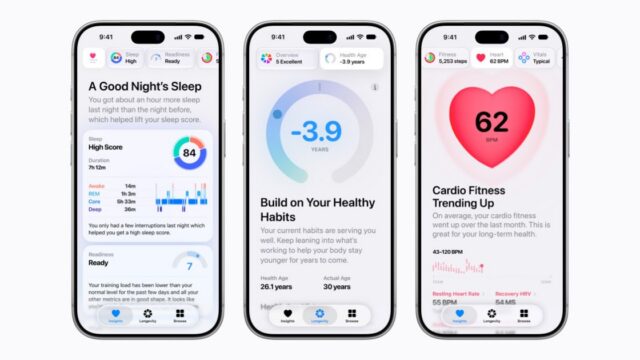
MacRumors reports that iOS 27.3 brings the redesigned Health app, with custom Insights and Longevity information. Apple Music gets a new feature called Selfie Sing. The iPhone Duo now supports Reachability, and StandBy has been changed on other iPhone models.
Apple Watch gets Live Rewind and Siri Recap
Owners of an Apple Watch Series 12 or Ultra 4 can test two Audio Intelligence features. Live Rewind makes a transcript of the last 15 seconds of speech. Siri Recap gives a high-level summary of the conversations you had over the course of the day.
What’s new on the Mac
macOS Golden Gate 27.3 has the same Safari features and brings Live Activities to Macs that lack a Dynamic Island, according to MacRumors. Quick Look can now render Markdown, so .md files open with proper formatting instead of raw syntax.
There is also a new screensaver, Pro Lighteensaver, in which light travels along metallic-looking lines that spell “PRO.” It matches the wallpaper that came with the new touchscreen MacBook Pro. The public beta build number is 26C5035r, the same as the developer build, 9to5Mac reported.
What it means for iCloud link sharing
One change matters even for people who skip the beta. Apple confirmed earlier this week that starting with macOS 27.3, it will check files and photos shared through public iCloud links set to “Anyone with the link” for potentially harmful content. Apple may remove flagged content or take action against accounts that break its policies, according to 9to5Mac.
If you share family photos or work files through open iCloud links, those files will be subject to the checks once the update is installed.
How to install the public beta
The program is free. Sign up at beta.apple.com, then open the Settings app on each device you enrolled and go to Software Update, where the beta appears for download.
The update follows iOS 27.2, which Apple released on Oct. 26. That version was the first major iOS 27 update and put the iPhone Duo on the same version of iOS as other iPhone models.